Gratis en Línea
Desbloqueador de Sitios Web Navegador
La Llave para un Internet Abierto en 2026
Estás investigando para una tarea, intentando abrir Reddit para un tutorial, o simplemente viendo una explicación en YouTube—y boom: "Acceso Denegado".
Bloqueado por la red de tu escuela o trabajo.
Dos palabras que matan instantáneamente la productividad. Ya seas un estudiante intentando acceder a investigaciones, un empleado bloqueado de las redes sociales, o un viajero aislado de las noticias de casa, los muros digitales están en todas partes.
Pero no necesitas software complejo o suscripciones costosas para atravesarlos. Los Desbloqueadores de Sitios Web (o proxies web) son tus llaves digitales instantáneas.
En esta guía, no solo explicamos cómo funcionan—ponemos a prueba las mejores herramientas del mercado. Evaluamos más de 20 servicios para traerte la lista definitiva de los mejores desbloqueadores de sitios web para 2026.
¿Qué es un Desbloqueador de Sitios Web?
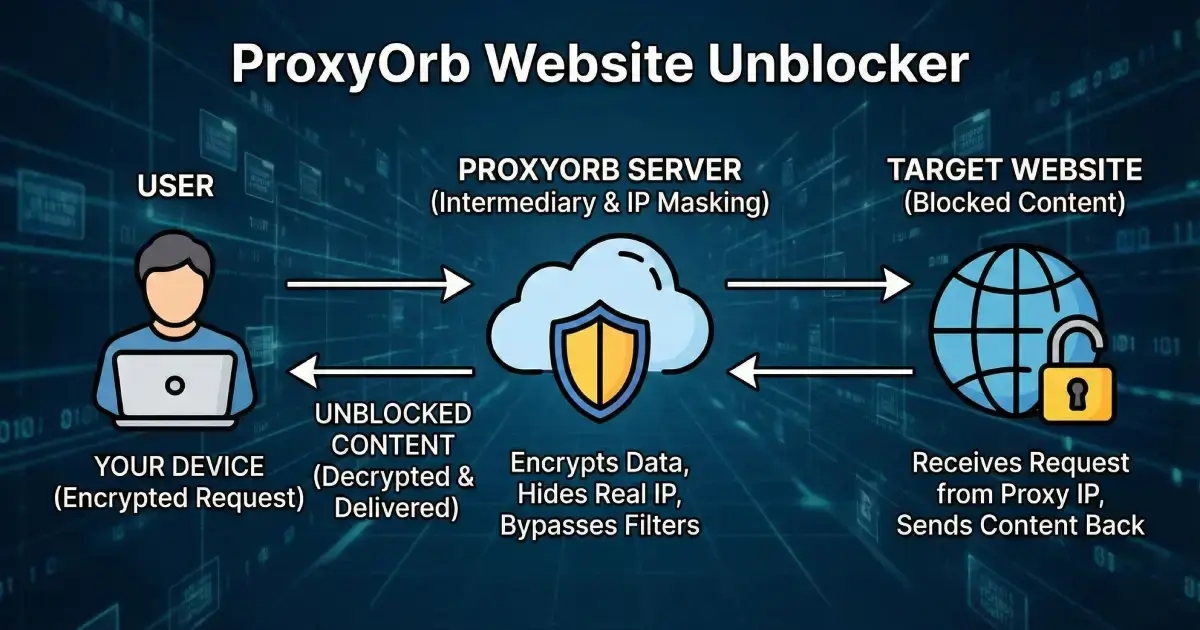
El diagrama paso a paso del desbloqueador de sitios web arriba muestra cómo tu navegador se conecta primero a ProxyOrb, luego nuestro servidor proxy solicita el sitio bloqueado en tu nombre, oculta tu dirección IP real y te devuelve el contenido desbloqueado.
Un desbloqueador de sitios web es una herramienta basada en navegador que actúa como intermediario entre tú e internet.
Piénsalo como "ver un sitio web bloqueado a través de otra computadora que no está bloqueada".
Cuando ingresas una URL arriba, nuestro servidor obtiene el contenido y te lo muestra.
- Tu Administrador Ve: Una conexión a
proxyorb.com(Permitido). - El Sitio de Destino Ve: Una solicitud de nuestro servidor seguro (Anónimo).
- Tú Ves: El contenido que quieres.
Características Clave de un Buen Desbloqueador en 2026
Antes de elegir una herramienta, asegúrate de que cumpla con estos requisitos:
- Soporte HTTPS: Encripta tu conexión para prevenir el espionaje.
- Renderizado de JavaScript: Carga sitios modernos (como Discord o Twitter) correctamente.
- Sin Instalación: Funciona directamente en tu navegador.
- Soporte de Video HD: Transmite YouTube sin buffering.
- Sin Registros: No almacena tu historial de navegación.
Cómo Probamos: Nuestros Criterios de Clasificación
No todos los proxies son creados iguales. Para asegurar que solo recomendamos herramientas seguras, probamos cada servicio contra estos estrictos estándares:
- Velocidad y Latencia: Debe cargar una página de noticias estándar en menos de 3 segundos.
- Seguridad: Debe soportar HTTPS forzado (SSL) para prevenir la interceptación de datos.
- Capacidad de Streaming: Debe reproducir videos de YouTube en al menos 720p sin buffering.
- Compatibilidad Moderna: Debe soportar el renderizado de marcos modernos como React, Next.js, Vue y sitios pesados en JS.
- Amigable con Móviles: Debe renderizarse correctamente en navegadores iOS y Android.
Top 5 Desbloqueadores de Sitios Web en 2026 (Resultados de Pruebas)
Basado en nuestros criterios de prueba, aquí están los mejores rendimientos.
1. ProxyOrb (Mejor Rendimiento General)
Sitio Web: Desbloqueador de Sitios Web Gratuito en Línea
Resultados de Pruebas: En nuestras pruebas del mundo real, ProxyOrb manejó consistentemente los sitios web modernos mejor que los proxies más antiguos, especialmente aquellos que dependen de aplicaciones pesadas en JavaScript. Mientras que los proxies heredados a menudo rompían el diseño de sitios como Twitter o Discord, ProxyOrb los renderizó correctamente.
- Velocidad: 9/10 (Nodos de enrutamiento optimizados)
- Video: 9/10 (Soporta streaming HD)
- Privacidad: 10/10 (Política estricta de no registros)
Veredicto: Una opción robusta para usuarios que necesitan fiabilidad sin instalación, particularmente para aplicaciones web modernas.
2. CroxyProxy (Mejor para Streaming de Video)
Resultados de Pruebas: CroxyProxy es un servicio veterano que se especializa en compatibilidad de video.
- Velocidad: 8/10
- Video: 10/10 (Excelente soporte de YouTube)
- Privacidad: 8/10 (Soportado por anuncios)
Veredicto: Si tu objetivo principal es ver YouTube y no te importa ver anuncios publicitarios, CroxyProxy es una alternativa sólida.
3. Hide.me (Mejor para Privacidad)
Resultados de Pruebas: Respaldado por una compañía VPN de buena reputación, el proxy gratuito de Hide.me es seguro pero puede ser más lento durante las horas pico.
- Velocidad: 7/10
- Video: 6/10 (Lucha con alta tasa de bits)
- Privacidad: 10/10 (Encriptación estándar de la industria)
Veredicto: Ideal para usuarios conscientes de la seguridad que necesitan revisar una página web estática o leer contenido basado en texto de forma segura.
4. ProxySite.com (Mejor para Cambio de Servidor)
Resultados de Pruebas: Una herramienta clásica que te permite alternar entre servidores de EE. UU. y la UE manualmente.
- Velocidad: 7/10
- Video: 7/10
- Privacidad: 8/10
Veredicto: Confiable para desbloquear redes sociales como Facebook, aunque la interfaz se siente anticuada en comparación con los competidores modernos.
5. KProxy (Mejor para Uso Escolar)
Resultados de Pruebas: KProxy ofrece una extensión de navegador portátil, haciéndolo popular en entornos educativos.
- Velocidad: 6/10 (La versión gratuita tiene tiempos de espera)
- Video: 6/10
- Privacidad: 8/10
Veredicto: Una buena opción de respaldo si necesitas una extensión de navegador en lugar de un portal basado en web.
Comparación: Desbloqueador de Sitios Web vs. VPN
¿Qué herramienta es adecuada para tus necesidades?
| Característica | Desbloqueador de Sitios Web (Proxy) | VPN (Red Privada Virtual) |
|---|---|---|
| Tiempo de Configuración | Instantáneo (0 segundos) | 5-10 Minutos (Instalar App) |
| Costo | Gratis | $5 - $15 / mes |
| Encriptación | Solo Pestaña del Navegador | Todo el Dispositivo |
| Mejor Caso de Uso | Desbloquear una URL específica rápidamente | Proteger banca/contraseñas en WiFi público |
Los desbloqueadores de sitios web son herramientas poderosas, pero elegir la incorrecta puede exponer tus datos de navegación. Es por eso que solo recomendamos servicios que hemos probado personalmente.
Preguntas Frecuentes sobre el Desbloqueador de Sitios Web
¿Puede un desbloqueador de sitios web gratuito hacerme completamente anónimo?
¿Los desbloqueadores de sitios web gratuitos almacenan mis datos de navegación?
¿Por qué algunos desbloqueadores de sitios web y proxies web son gratuitos?
¿Qué hace realmente un desbloqueador de sitios web?
¿Es seguro usar un desbloqueador de sitios web?
¿Es legal usar un desbloqueador de sitios web o proxy web?
¿Puede mi escuela o lugar de trabajo ver lo que navego cuando uso un desbloqueador de sitios web?
¿El uso de un desbloqueador de sitios web ralentizará mi internet?
¿Puedo ver videos y contenido de streaming a través de un desbloqueador de sitios web?
¿Puede un desbloqueador de sitios web evitar los registros de WiFi?
¿Puedo usar este desbloqueador de sitios web en la escuela o el trabajo?
¿Listo para Navegar Libremente?
Únete a millones de usuarios que confían en ProxyOrb para acceso seguro y anónimo a internet.
Probar Sitio Proxy